
Follower Protection
Please read the documentation carefully to understand this feature and to determine if it is appropriate for your trading style. Always monitor your positions during the trading session.
Follower Protection is a safety feature that automatically detects and corrects position discrepancies between your leader account and follower accounts. When enabled, it monitors your leader account and takes action when the leader's position is closed (goes flat) but one or more follower accounts still have open positions.
Why You Need It
In normal copy trading, when the leader places an order, the same order is copied to all follower accounts. However, there are scenarios where follower accounts can end up out of sync with the leader:
- Partial fills — A follower's order may only partially fill or not fill at all due to market conditions.
- Cancelled orders — A follower's order may be cancelled before it executes (e.g., due to insufficient margin or account restrictions).
- Rejected orders — A follower's order may be rejected by the brokerage.
-
Manual intervention — A follower's order may be manually cancelled or modified outside of FutuCopy.
Without Follower Protection, these discrepancies go unnoticed and follower accounts may be left holding positions after the leader has exited.
How It Works
- When the leader account closes its position and goes flat (zero contracts), Follower Protection starts a configurable countdown timer.
- During the countdown, the system waits to allow any resting orders on follower accounts time to execute naturally.
- If the leader re-enters a position during the countdown window, the check is automatically cancelled — no action is taken.
- After the countdown expires, the system checks each enabled follower account's position on the configured contract.
- If any follower still has an open position (a discrepancy), the system will cancel any open orders and flatten the position on that follower account to bring it back in sync.
-
The system will also check if any of the followers have live orders that do not have a matching leader order and will cancel those orders.
Enabling Follower Protection
- Go to the Trade Copy page and select your copy trading configuration.
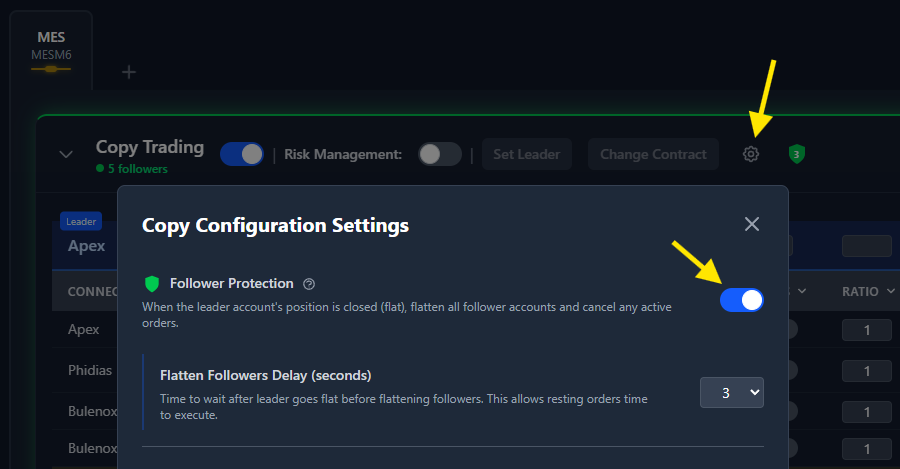
- Click the gear icon to open the Copy Configuration Settings modal.
- Toggle Follower Protection to enable it.
- Set the Flatten Followers Delay — this is the number of seconds to wait after the leader goes flat before checking follower positions. The default is 5 seconds. Available values are 3 to 8 seconds.
- Click Save Changes.
The Shield Icon
When Follower Protection is enabled, a green shield icon appears next to the settings gear icon in the follower accounts table. The number inside the shield shows the configured delay in seconds.
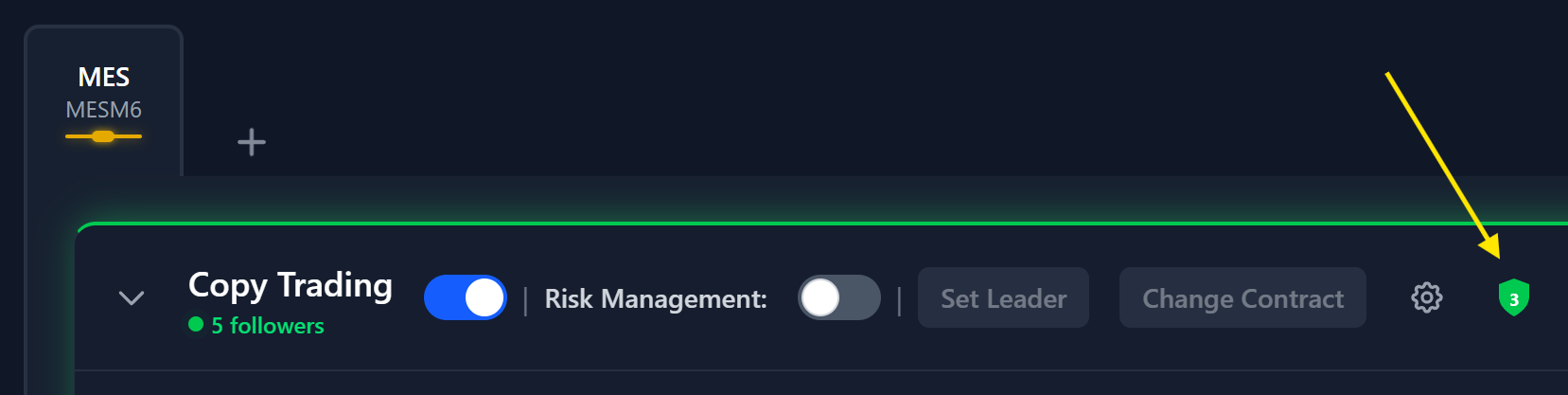
The shield icon changes color and behavior to indicate the current status:
- Green shield — Protection is active and idle. The number shows your configured delay.
- Yellow shield with countdown — The leader just went flat and the countdown timer is active. The number counts down second by second.
- Red blinking shield — The countdown has expired and the system is actively checking and flattening follower positions and cancelling orphan orders.
If the leader re-enters a position during the countdown, the shield returns to its idle green state and no action is taken.
Out-of-Sync Indicator
Regardless of whether Follower Protection is enabled, the follower accounts table highlights any account whose position is out of sync with the leader. An account is considered out of sync when its actual position does not match the expected position (leader position multiplied by the follower's ratio).
Out-of-sync accounts are shown with:
- A yellow background on the account row.
- A small warning icon next to the position value.
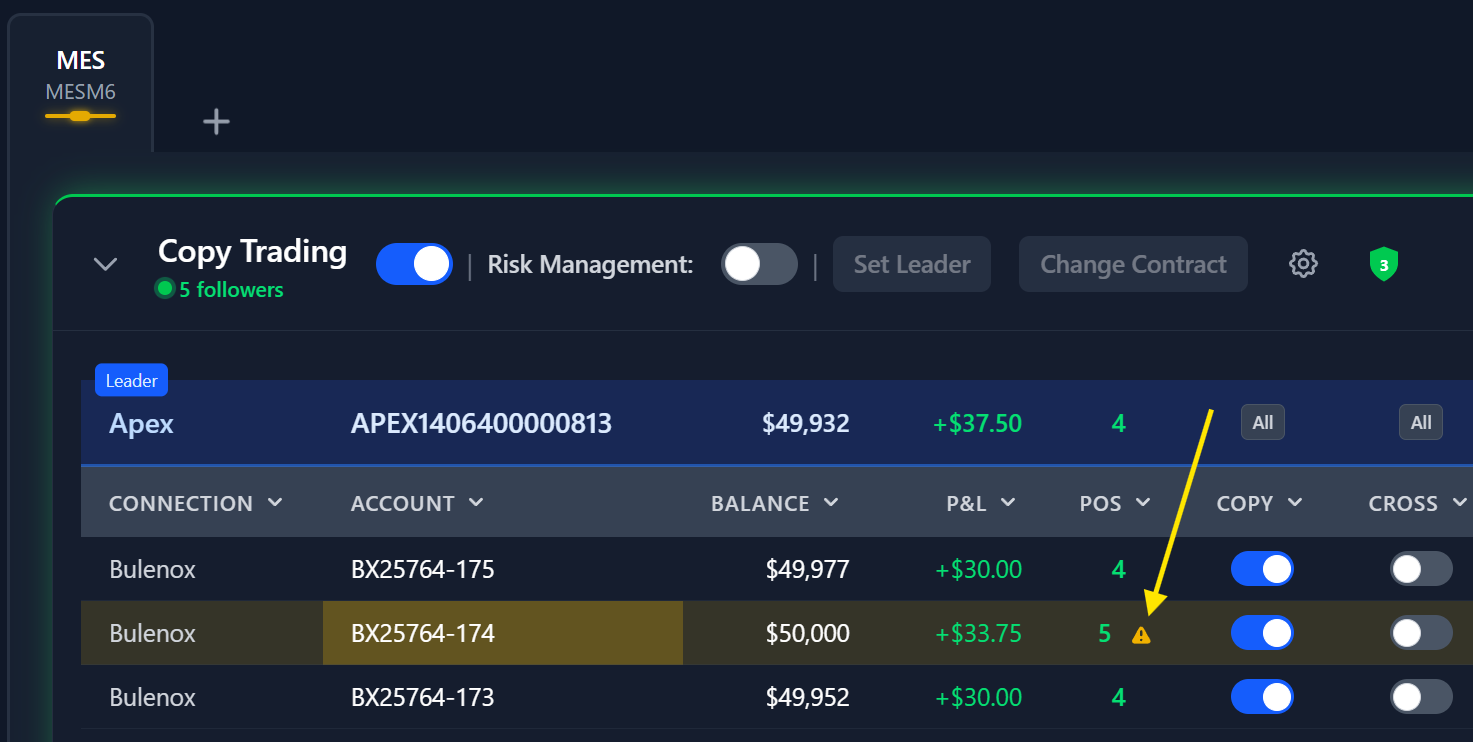
This indicator updates in real-time as positions change, so you can always see at a glance whether all your follower accounts are properly synchronized.
Choosing the Right Delay
The delay setting controls how long the system waits after the leader goes flat before checking followers. Consider these factors when choosing a value:
- Shorter delay (3-4 seconds) — Faster protection, but less time for resting limit orders to fill. Use this if your followers typically use market orders.
- Medium delay (5 seconds) — The default. Provides a good balance between protection speed and allowing orders to fill.
- Longer delay (6-8 seconds) — More time for limit orders to fill naturally. Use this if your followers frequently have resting limit orders that take a few seconds to execute.
Important Notes
- Follower Protection is configured per copy trading configuration (per leader), not globally.
- Only enabled followers are checked. Followers with copying turned off are skipped.
- The position check accounts for each follower's ratio. For example, if the leader had 2 contracts and a follower has a 0.5 ratio, the expected follower position is 1 contract.
- In the vast majority of cases (99%+), all followers will already be flat when the check runs, and no action will be taken. The feature is designed to catch the rare edge cases where synchronization fails due to external factors outside FutuCopy's control.
- When a discrepancy is found and the system needs to flatten a follower, copy trading is briefly paused (the copy rule is disabled), the follower is flattened, and then copy trading is automatically re-enabled.