
Use Market Orders for Followers
This feature changes how FutuCopy mirrors your leader's orders to your follower accounts. Instead of copying pending orders (Limit, Stop, SL/TP) as the leader places them, followers stay idle until the leader's orders actually fill. Each leader fill - including partial fills - triggers a Market order on every enabled follower account, sized by the configured ratio.
This feature is especially helpful for traders who:
- Place frequent limit orders and modify them often.
- Trade multiple prop firm accounts through Tradovate and hit API rate limits.
- Have experienced follower desync caused by rejected pending orders or partial fills.
How to enable it
Open the copy configuration settings for a leader and toggle Use Market Orders for Followers on.
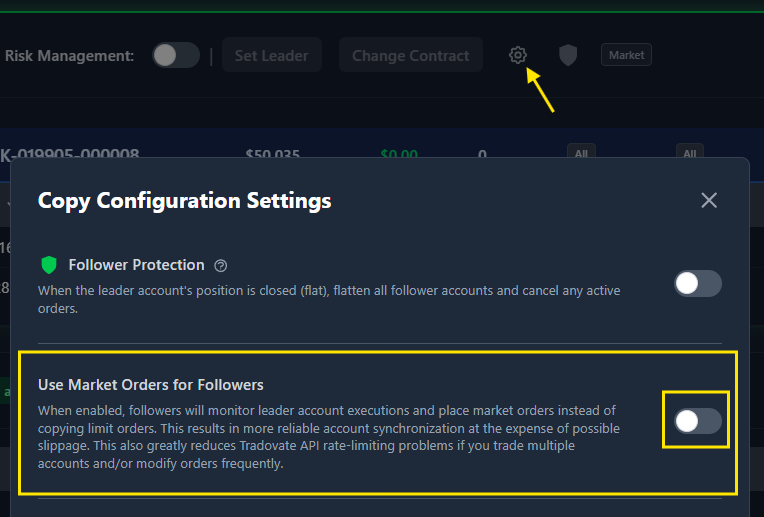
The toggle is per-leader, so you can enable it for some configurations and leave it off for others. Changes take effect immediately - no restart or reconnection needed.
What changes when it is enabled
Pending orders are no longer copied. When your leader places a Limit order, a Stop order, or attaches SL/TP brackets, followers receive nothing and no pending orders sit on the follower side.
Followers react only to leader fills. The moment the leader's order actually executes (in full or partially), FutuCopy immediately places a matching Market order on each enabled follower account. Direction and size match the leader's fill scaled by the follower's ratio.
Partial fills are handled one by one. If the leader's 10-contract limit fills as 3 + 4 + 3, each follower receives three separate Market orders (3, 4, 3) as the fills arrive - not a single 10-contract order at the end. Follower accounts stay in sync with the leader as the position builds.
Cancellations are ignored. If the leader cancels an unfilled order, nothing happens on the follower side - there was nothing to cancel.
How to tell it is active
A purple Market badge appears next to the Follower Protection shield in the follower accounts table header whenever the feature is enabled. The badge turns gray when it is disabled.
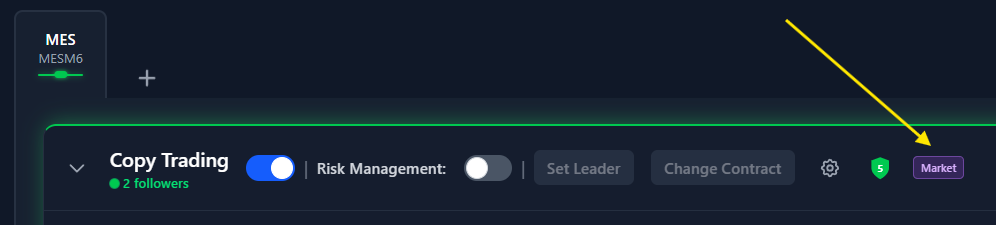
Hover the badge to see the current state described in the tooltip.
Trade-offs
Slippage. Because followers enter via Market orders triggered by the leader's fill, the follower's fill price may differ slightly from the leader's - sometimes better, sometimes worse, depending on market conditions and spread. This feature is not recommended for news trading, where sudden price jumps can cause significant slippage between the leader's fill and the follower's market entry.
Small timing delay. The follower's Market order is placed the moment FutuCopy receives the leader's fill event. In practice this is milliseconds, but it is not zero.
When to use it vs. standard copy mode
Enable Use Market Orders for Followers when reliability of account synchronization is more important than matching the leader's exact entry price, or when you're running many accounts and want to reduce Tradovate API rate-limiting errors.
Keep it disabled when you want pending orders (stops, limits, brackets) visible on follower accounts, or when avoiding any slippage relative to the leader is the priority.