
Copier Modes: Direct vs Position-Aware
Every copy configuration on the Trade Copy page has a Copier Mode setting. It decides what happens when the leader exits a trade and a follower does not hold the same position as the leader.
There are two modes:
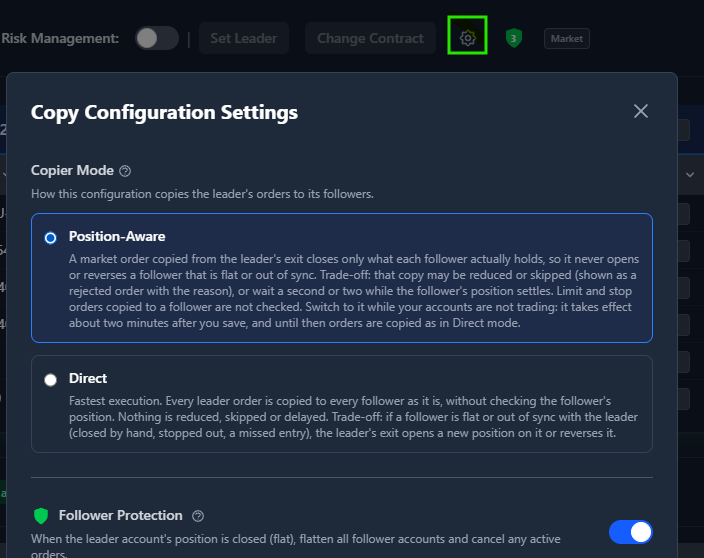
- Direct copies every leader order to every follower exactly as it is. It never looks at the follower's position.
- Position-Aware checks each follower's position before it copies an exit. The exit copy closes only what the follower actually holds, so it never opens a new position or reverses a follower that is flat or out of sync.
When every follower holds the same position as the leader, both modes copy the same orders. The difference only shows when a follower is out of sync.
Why followers fall out of sync
A follower can end up with a different position than the leader for reasons that have nothing to do with the copier, for example:
- You closed a follower by hand, to take profit early or to cut a loss.
- The broker refused the follower's entry copy.
- A limit order copied to the follower filled only in part, or did not fill, while the leader's order filled.
- The follower's stop loss filled and the leader's did not. Different brokers can fill at slightly different prices.
Once a follower is out of sync, the leader's next exit is where the two modes behave differently.
Direct mode
Every leader order goes to every follower as it is: same side, same quantity (after your follower ratio). Nothing is reduced, skipped or delayed.
Trade-off: if a follower is flat or holds less than the leader, the leader's exit opens a new position on that follower or reverses it. For example, the leader sells 2 to close a long 2 position. A follower that is already flat also sells 2, and is now short 2.
Position-Aware mode
Before an exit is copied, FutuCopy checks what the follower holds on that contract, including copies that are still filling. Quantities are compared after your follower ratio is applied. Then:
- If the follower holds at least what the exit closes, the copy is sent unchanged.
- If the follower holds less, the copy is reduced to what the follower holds.
- If the follower holds nothing to close (it is flat, or holds the opposite side), the copy is skipped.
A reduced or skipped copy shows in the follower's orders as a rejected order with the reason, for example:
Skipped: follower holds no long position to close (leader 2→0)
Reduced 4→2: follower holds 2 to close
These are not errors. FutuCopy did not send that order, or that part of it, to the broker, because it would have opened a new position on the follower.
What Position-Aware does not change:
- Entries are never reduced. When the leader opens a position or adds to one, every follower gets the full copy, as in Direct mode.
- Limit and stop orders copied to followers are not checked. This includes stop loss and profit target orders resting on follower accounts. The check applies to market orders copied from the leader, and to every copy when Use Market Orders for Followers is turned on.
- It does not re-sync followers. It does not add missing contracts or close extra ones. To flatten followers when the leader goes flat, use Follower Protection.
Trade-offs:
- A copy may wait a second or two while a follower's position is still updating, for example when a fill was just reported but the account position has not caught up yet. Most copies go out with no wait.
- If FutuCopy cannot confirm a position, for example right after a broker connection reconnects, the copy goes out as in Direct mode instead of being blocked.
- Position-Aware takes effect about two minutes after you save. Until then, orders are copied as in Direct mode.
Example scenarios
All examples use a 1:1 follower ratio.
1. Scaling out after one follower was closed by hand
Before: Leader long 3. Followers A and B long 3. You closed follower C by hand to take profit early, so C is flat.
Leader: sells 1, then sells the other 2 a few minutes later.
Direct: after the first sell, A and B are long 2 and C is short 1. The leader, A and B are long while C is short: a cross-account hedge (see Prop firm hedging rules below). After the second sell, A and B are flat and C is short 3.
Position-Aware: both of C's copies are skipped. C stays flat, and A and B follow the leader as usual.
2. A follower holds only part of the position
Before: Leader long 4. The follower is long 2: its limit entry filled only 2 contracts, or you closed 2 by hand.
Leader: sells 4 to close.
Direct: the follower sells 4 and is now short 2.
Position-Aware: the copy is reduced to 2 and the follower is flat. The 2 contracts that were not sent show as a rejected order: "Reduced 4→2: follower holds 2 to close".
3. The leader reverses
Before: Leader long 2. Follower A long 2. Follower B flat.
Leader: sells 4, which closes the long 2 and opens a short 2.
Direct: A sells 4 and is short 2, like the leader. B sells 4 and is short 4, twice the leader's position. That can also go over a firm's maximum position size.
Position-Aware: A sells 4 and is short 2. B sells only 2 and is short 2. B follows the leader into its new position, but not further.
4. A follower holds the opposite position
Before: Leader long 1. You opened a short 1 on the follower by hand.
Leader: sells 1 to close.
Direct: the follower sells 1 and is now short 2.
Position-Aware: the copy is skipped. The follower keeps the short 1 you opened. Position-Aware does not close positions you opened yourself.
5. All followers are in sync
Before: Leader long 2. Every follower long 2.
Leader: sells 2 to close.
Both modes: every follower sells 2 and is flat. Position-Aware sends the copies unchanged.
Prop firm hedging rules
Many prop firms do not allow hedging across accounts: holding a long position in one of your accounts while another of your accounts holds a short position in the same or a related instrument (for example, MNQ long in one account and MNQ or NQ short in another). Firms look at all the accounts you hold with them together. A violation can mean a failed evaluation, a closed funded account, a denied payout, or a ban from the firm. Rules differ between firms and change over time, so check your firm's current rules.
When one leader is copied to several accounts, they should all hold the same direction. In Direct mode, a single out-of-sync follower can break this without you placing a trade on it: in scenario 1 above, follower C is short while the leader and the other followers are long.
Position-Aware is designed to prevent this. An exit copy never takes a follower past flat into the opposite direction, so a leader's exit cannot leave a follower opposite to the leader. It does not cover positions you open by hand, limit and stop orders copied to followers, or the moments listed under Trade-offs above, when copies go out as in Direct mode.
Which mode should I choose?
Choose Position-Aware if:
- You are not able to monitor your accounts at all times. If a follower falls out of sync while you are away, the leader's exits will not open a new position on it or reverse it.
- You copy to prop firm accounts that have hedging rules.
- You sometimes close or manage a follower by hand.
- You scale out of trades in parts.
- You use Use Market Orders for Followers. Every copy is then a market order, so every exit is checked.
Choose Direct if:
- You want the fastest possible execution. Every leader order is copied right away, exactly as it is, with no position check and no possible wait.
- You monitor your accounts at all times, so you can spot an out-of-sync follower and fix it yourself before the leader's next exit.
- Your followers always stay in sync with the leader: you never trade them by hand, and their copies fill like the leader's orders.
- You exit mostly with limit and stop orders copied to followers, such as bracket stop loss and profit target orders. Position-Aware does not check those, so it adds little.
If you are not sure, Position-Aware is the safer choice for prop firm accounts. When your followers are in sync, it copies the same orders as Direct.
How to change the Copier Mode
- Make sure the leader and follower accounts of the configuration are flat and not trading.
- Open the Trade Copy page.
- On the copy configuration, click the gear icon (Copy Configuration Settings) next to Set Leader and Change Contract.
- Under Copier Mode, select Position-Aware or Direct.
- Click Save Changes.
The mode is set for each copy configuration, so different leaders or contracts can use different modes. New copy configurations start in Direct mode. Position-Aware takes effect about two minutes after you save.
Common questions
A follower shows rejected orders that say "Skipped" or "Reduced". Is something wrong?
No. FutuCopy did not send that order, or that part of it, to the broker, because the follower did not hold the position the leader was closing. Sending it would have opened a new position on the follower.
Will Position-Aware bring an out-of-sync follower back in line with the leader?
No. It only stops exits from opening or reversing positions. To flatten every follower when the leader goes flat, turn on Follower Protection.
Does Position-Aware slow down my copies?
Most copies go out with no wait. A copy may wait a second or two only while a follower's position is still updating.
Can I use Position-Aware with Use Market Orders for Followers and Follower Protection?
Yes. With Use Market Orders for Followers on, every copy is a market order, so Position-Aware checks every exit. Follower Protection then flattens any follower that is still holding a position after the leader goes flat.